Yen conversion for tax filing ›
Tax kit
Prop income and expenses (card, bank, crypto) + crypto gains + offshore FX profit, compiled by an AI agent on your PC.
When you pay a challenge fee by card, the yen amount on your statement depends on the card company's rate and foreign transaction fee, so you can't tell it from the dollar price. Payouts received at your bank are the same: the yen that arrived is your actual income. The kit reads your card and bank statements, matches each line to its challenge or payout, and books the actual yen amount.
If you pay challenge fees in USDT and receive payouts in crypto, it gets hard to tell how much you actually paid and received in yen. The money changes form several times: bank → exchange → wallet → swap → prop firm.
Offshore FX live accounts are the same: with several accounts, working out the yearly profit including swaps, commissions and bonuses takes time. With this kit, an AI agent on your PC (Claude Code) reads your exchange CSVs, on-chain history and MT4/MT5 reports and totals everything in yen. The results flow into prop-memo's tax page. It's free.
What you get when you ask
- A tax summary (one document) — prop income and expenses, crypto and offshore FX on one sheet; print and save as PDF for your filing
- Detail CSVs — every item with the rate used and yen amount (for your accountant or software)
- Results on prop-memo's tax page — statement yen amounts and market-value conversion, plus crypto and offshore FX tables
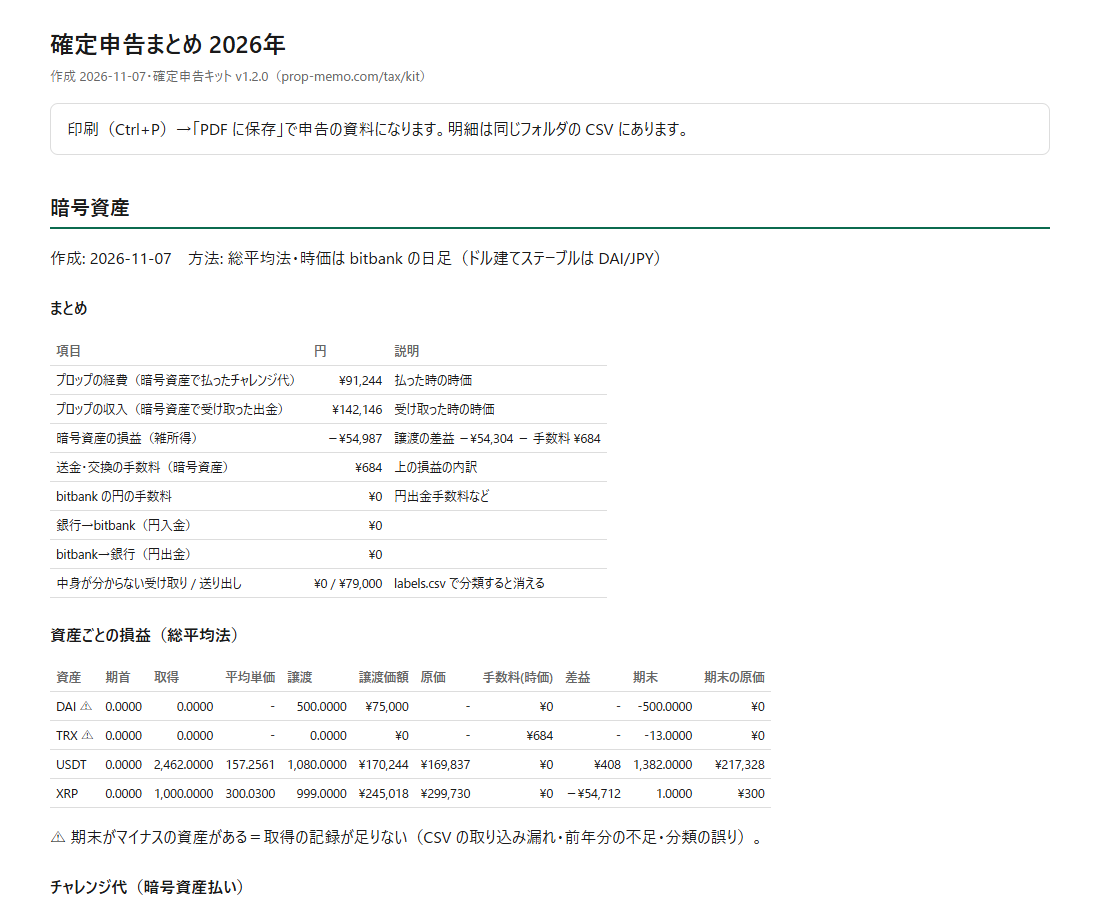
Sample (made-up data)
What it does
- Books challenge fees paid by card (monthly ones too) at the yen amount on your card statement, including the foreign transaction fee
- Books bank transfers and payouts received at your bank (including via Wise or Rise) at the yen amount on your bank statement
- Flags statement lines with no matching record (possible missed entries)
- Converts challenge fees paid in crypto to yen at the market value when you paid (expenses)
- Converts payouts received in crypto to yen at the market value when received (income)
- Calculates crypto gains, including swaps, transfers and fees, by the total average method
- Matches each payment to its challenge or payout automatically (the agent asks you when unsure)
- Totals yearly profit per offshore FX account (P/L, swaps, commissions, cash bonuses) from MT4/MT5 reports, converting USD accounts at the bank's published rate
- Writes the results back to prop-memo so they appear on the tax page
How to use it
- Unzip the kitYou get a tax-kit folder wherever you extract it.
- Connect Claude Code to prop-memo (first time only)Get an API key from "EA integration" on My page. Details: API・MCP
claude mcp add --transport http propmemo https://prop-memo.com/mcp --header "Authorization: Bearer <APIキー>" - Drop in your history filesCard and bank: download your card statement and bank transaction history as CSV into inbox/card and inbox/bank (major Japanese card issuers and banks are read automatically; the agent converts others).Crypto: for bitbank, download trades, dealer trades, JPY and crypto deposits/withdrawals into inbox/bitbank (the agent converts other exchanges). Offshore FX: save the HTML report (MT5: right-click History → Report; MT4: right-click Account History → Save as Report; XM annual statements also work) into inbox/fx.
- Open the folder in Claude Code and ask
cd tax-kit
claude
> Sum up this year
The first time, it asks for your wallets' public addresses. From there the agent fetches, classifies, checks with you, totals, and writes back to prop-memo (showing you what it will write first). - Check the resultsSee the reports in out/ and the tax page. Fees and payouts matched to statements use the statement's yen amount, those with crypto records use market value, and tables for crypto gains and offshore FX profit appear.
Only public (receiving) addresses are used. Never give your 12/24-word seed phrase, private keys, or exchange passwords to the kit, the agent, or anyone.
What's supported
Offshore FX: MT4 Statement.htm, MT5 history reports (HTML), XM member-page statements. Works with any MT4/MT5 broker such as Exness, XM or TitanFX
Crypto:
- Chains: XRP Ledger, Tron (TRC20), Ethereum, Arbitrum, BNB Chain, Polygon, Base, Optimism
- Some chains such as Arbitrum need a free Etherscan API key (or an explorer CSV)
- Exchanges: bitbank CSVs are read automatically; others are converted to the common format by the agent
- Fake tokens (e.g. fake USDT with the same name) are filtered out by contract address
- Yen prices: bitbank public daily prices; USDT and USDC use DAI/JPY
How prop income and expenses are converted
- Card: the yen amount on the card statement, which already includes the card company's rate and foreign transaction fee (about 1.6–3.9%). That is what you actually paid
- Bank transfers and payouts received at your bank: the yen amount sent or received on the bank statement
- Crypto: the yen market value when paid or received
- No statement: MUFG Bank's published TTM. Items recorded in yen use that amount
- Refunds are matched to card reversals or bank deposits and reduce expenses. Monthly plans are matched charge by charge
How offshore FX is calculated
- Taxable = trading P/L + swaps + commissions + bonuses paid as cash. Deposits and withdrawals are not profit
- Credit bonuses (usable only for trading) are shown separately for reference
- XM cost codes: EXP06 (credit compensation) counts as profit; EXP05 (deposit fee top-up) counts as a deposit
- USD accounts use MUFG Bank's published TTM, per transaction, monthly average or yearly average (keep the same method every year)
- Overlapping reports for the same account are not double-counted. Don't include prop firm demo accounts (prop income is counted by payouts)
How crypto is calculated
- Crypto gains use the total average method, pooled across all accounts and wallets per asset; stablecoins are included
- Swaps, paying challenge fees and network fees count as disposals
- Moving between your own accounts has no gain (the shortfall is a fee)
- On the tax page you can use either the market value or the bank rate for crypto payments. Keep the same method every year
Requests welcome any time
Exchanges, brokers or chains you want supported, reports the kit couldn't read, totals you'd like: send them any time by DM to the site owner on X: @hosono_p. Requests are handled in kit updates. More in the announcement.
This is a calculation aid. Income category and what counts as an expense are for you or your tax accountant to decide. The kit will keep improving (to update, replace cl, run.py and CLAUDE.md; your settings and classifications stay).