Tax Kit Released: An AI Agent Totals Challenge Fees Paid by Card, Bank or Crypto and Offshore FX Profit (Free, November 2026)
※ The kit is a calculation aid. Income category and what counts as an expense are for you or your tax accountant to decide. The site owner built it for their own filing and is sharing it as is.
Summary
- Ask an AI agent to "sum up this year" and you get your tax documents. We released a free "tax kit." Download it from the tax kit page.
- Card and bank payments too: challenge fees (monthly ones included), payouts and refunds are matched to the yen amount on your card statement and your bank statement, so they're booked at what you actually paid and received. Statement lines with no matching record (missed entries) are flagged.
- Crypto: converts challenge fees paid in crypto and payouts received in crypto to yen at the market value at the time, and calculates crypto gains with the total average method.
- Offshore FX: from MT4/MT5 reports and XM statements, totals yearly profit per account (trading P/L, swaps, commissions, cash bonuses) and converts USD accounts at the bank's published rate.
- All you do is say "Sum up this year." The AI agent on your PC (Claude Code) fetches, classifies, checks, totals and builds the documents. It only asks you about transactions it can't decide.
- The results show up on prop-memo's tax page (/tax).
- Requests are welcome any time. Exchanges, brokers or chains you want supported: send them in (contact at the end).
What you get when you ask
Ask the AI agent to "sum up this year," and at the end you have these three things:
- A tax summary (one document): an HTML page with your prop income and expenses (all payment methods), crypto and offshore FX results on one sheet. Open it in a browser, print and "Save as PDF," and it's ready for your filing. The agent opens it for you when it's done.
- Detail CSVs: every trade, deposit/withdrawal and fee, with the rate used and the yen amount, for your tax accountant or accounting software.
- Results on prop-memo's /tax: fees and payouts matched to statements use the statement's yen amount, crypto ones use market value, and tables for crypto gains and offshore FX profit appear.
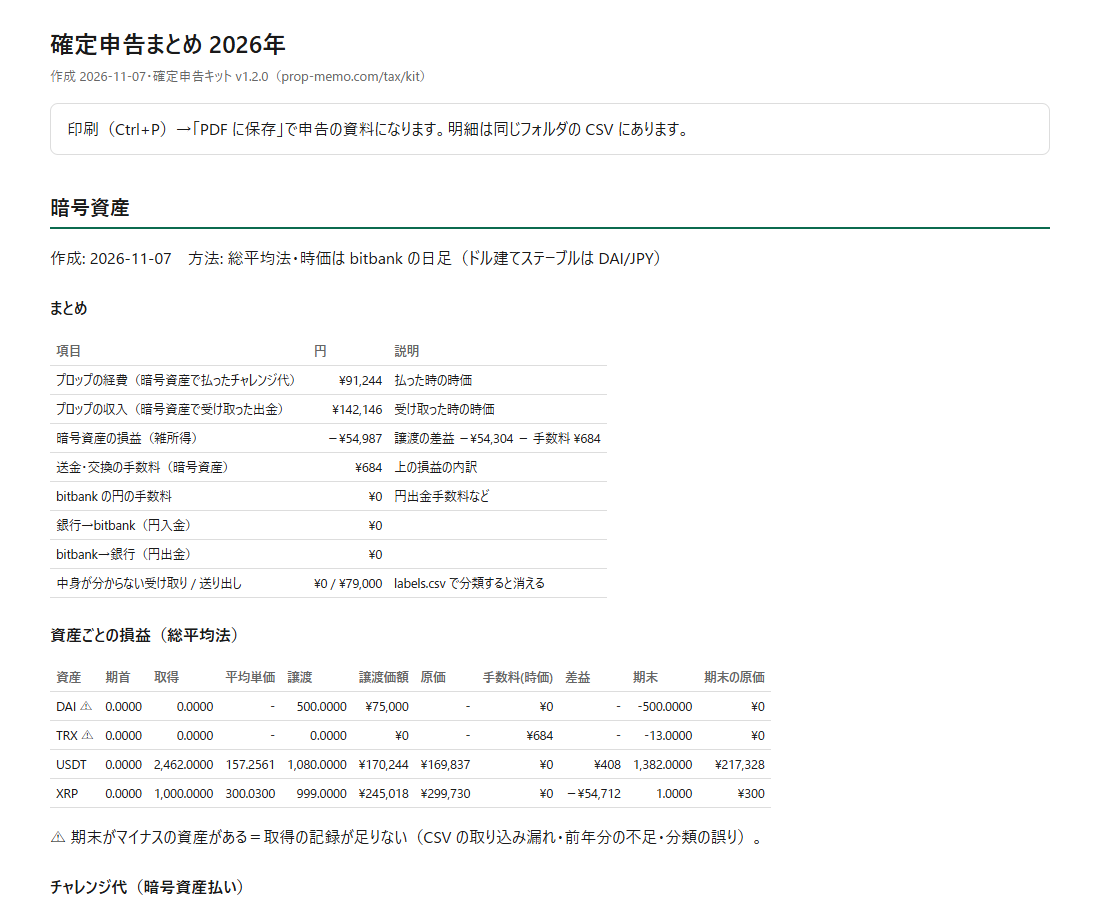
The sample uses made-up data (the image shows the crypto and offshore FX parts; from v1.3.0 a "prop firm income and expenses" table comes first). The crypto summary, gains per asset (total average method), challenge fees and payouts sit on one sheet with offshore FX profit per account.
Why we built it
The site owner pays some challenge fees in USDT and receives some payouts in crypto. The money flows like this:
Bank (JPY) → bitbank (JPY → XRP) → Trust Wallet → swap service to USDT → prop firmProp firm / Rise → Trust Wallet (USDC) → swap to DAI → bitbank (→ JPY) → bankBecause the money changes form so many times, it became impossible to tell how much was actually paid and received in yen. Every swap and transfer also creates a crypto gain or loss. Tracking that by hand is not realistic.
Card payments have the same problem. Pay a $540 challenge fee by card, and the yen on your statement is set by the card company's rate and foreign transaction fee (about 1.6–3.9%). It won't match the dollar price times a bank rate. The expense is the yen amount you actually paid on the statement, and payouts received at your bank are income at the yen amount that arrived.
Offshore FX live accounts are the same. With more accounts, totalling the year's profit, including how swaps, commissions and bonuses are treated, takes real effort.
So we let an AI agent do the totalling and fixed the calculation rules in the kit. Where judgment is needed (is this transfer a swap or a move to my own account?), the agent looks, and asks you if it isn't sure.
What it does
| Card & bank | Crypto | Offshore FX | |
|---|---|---|---|
| Reads | Card statements and bank transaction history (CSV) | Exchange CSVs (bitbank automatically), on-chain history (fetched from your public addresses) | MT4 Statement.htm, MT5 history reports, XM statements |
| Produces | Actual yen amounts of challenge fees (each monthly charge), costs, refunds and payouts, plus possible missed entries | Yen market value of challenge fees (expenses) and payouts (income), crypto gains (total average method), fees | Per-account trading P/L, swaps, commissions, cash bonuses, and yearly profit in yen |
| prop-memo link | Matches each payment to its challenge or payout and writes it back | Matches each payment to its challenge or payout and writes it back | Writes the yearly totals back |
Statements read automatically include major Japanese card issuers (Rakuten, SMBC Vpass, JCB, Epos, d Card, Amex) and banks (SBI Sumishin / d NEOBANK, Rakuten Bank, MUFG, Japan Post Bank). The agent converts other formats to the common format.
Supported chains: XRP Ledger, Tron (TRC20), Ethereum, Arbitrum, BNB Chain, Polygon, Base and Optimism. Fake tokens with the same name (such as fake USDT) are filtered out by contract address.
How to use it
- Download and unzip the kit from the tax kit page (needs Python 3.10+, no extra libraries)
- Connect Claude Code to prop-memo (first time only; get an API key from "EA integration" on My page; details in API & MCP)
- Drop in your history files
- Card and bank: download your card statement and bank transaction history as CSV into
inbox/cardandinbox/bank(the year plus the following month) - Crypto: bitbank trade, dealer, JPY and crypto deposit/withdrawal CSVs into
inbox/bitbank - Offshore FX: the HTML report (MT5: right-click the History tab → Report; MT4: right-click Account History → Save as Report) into
inbox/fx
- Card and bank: download your card statement and bank transaction history as CSV into
- Open the folder in Claude Code and say "Sum up this year"
If you don't use crypto, card and bank statements are all you need. If you do, the first time it asks for your wallets' public addresses. Private keys and seed phrases (12/24 words) are never used. Never give them to anyone.
Calculation rules
Card and bank payments
- Challenge fees paid by card are expensed at the yen amount on the card statement, which already includes the card company's rate and foreign transaction fee. That's what you actually paid, so no separate fee is added.
- Bank transfers use the amount sent on the bank statement; payouts received at your bank (including via Wise or Rise) are income at the yen amount that arrived.
- Monthly plans (such as futures props) are matched charge by charge. Refunds are matched to card reversals or bank deposits and reduce expenses.
- Matching uses the merchant name (firm name), date and amount. When the name or amount is unclear, the agent asks you.
- Payments with no statement are converted at MUFG Bank's published TTM.
- Statement lines with no matching record on prop-memo are flagged as possible missed entries.
Crypto
- Gains use the total average method, pooling all accounts and wallets per asset.
- Swaps between crypto assets, paying challenge fees and network fees count as disposals, valued at that day's yen market price.
- Challenge fees paid in crypto: the market value paid is a prop expense.
- Payouts received in crypto: the market value received is prop income (the same amount becomes that asset's acquisition cost).
- Moving between your own accounts has no gain; the shortfall on arrival is a fee.
- Yen prices are bitbank's public daily prices; USDT and USDC use DAI/JPY.
USDT, USDC and DAI are all calculated as crypto assets. Strictly speaking, USDC can be treated separately as an "electronic payment instrument" (explained in our article on converting a The5ers payout to yen). The kit prioritizes a method you can explain the same way every year and calculates them uniformly.
Offshore FX
- Taxable = trading P/L + swaps + commissions + bonuses and compensation paid as cash. Deposits and withdrawals are not profit.
- Credit (bonuses usable only for trading) is shown separately for reference.
- XM cost codes: EXP06 (credit compensation) counts as profit; EXP05 (deposit fee top-up) counts as a deposit.
- USD accounts are converted at MUFG Bank's published TTM: per transaction, monthly average or yearly average.
- Overlapping reports for the same account are never double-counted.
- Don't include prop firm (demo) accounts. Prop income is counted by payouts.
Whatever method you choose, keeping the same method every year matters most. On prop-memo's /tax you can also choose whether to use the kit's records (statement yen amounts and crypto market values) or the bank rate for everything.
Not supported yet
- Card and bank statement formats differ by company. Statements the kit can't read automatically are converted to the common format by the agent (it can read PDFs too).
- CSVs from exchanges other than bitbank aren't read automatically (the agent converts them to the common format).
- Some chains such as Arbitrum need a free Etherscan API key (an explorer CSV also works).
- XM statements haven't been checked against real data yet.
Requests welcome any time
The site owner uses this kit every year and will keep improving it. Requests like these are welcome at any time:
- Card issuers, banks, exchanges, brokers or chains you want supported
- Reports or CSVs the kit couldn't read (remove personal information first)
- "I'd like this total too" or "this part is confusing"
Send them by DM to the site owner on X (@hosono_p). Requests are handled in kit updates. Updating only means replacing the kit's cl folder, run.py and CLAUDE.md; your settings and classifications stay.
Related
Written by
Hosono P | the prop firm strategist
I buy challenges with my own money and record everything through to the payout. Recorded payouts: ¥6.1M in total from Fintokei, Fundora and Funded7, plus $14,297 from The5ers and RZR Funded (as of November 2026). Author of the semi-discretionary EA "ELDRA".